A GSM unlocked iPhone is an iPhone that can use any sim card from various network service providers.
Sadly, some folks have GSM-locked iPhones, usually if you buy your device from a mobile network service provider such as Verizon, T-Mobile, or AT&T.
Don't worry about it too much. Technology provides you with multiple ways to go around this hurdle.
Join me in this expose' of GSM-locked iPhones and how to unlock your iPhone to enjoy the benefits of network freedom.
This way, ladies and gents.
Meaning of GSM Unlocked iPhone
Service providers usually prefer GSM or CDMA signals to transmit their network services.
T-Mobile and AT&T use a GSM network, while Verizon uses a CDMA signal. Knowing the difference is good since you can encounter roadblocks when switching between the two.
A GSM-unlocked iPhone lets you use any GSM sim card on your phone, including T-Mobile and AT&T.
GSM-locked iPhones do not enjoy this freedom, which makes it necessary to unlock your phone.
You may like: All About a Factory-Unlocked iPhone
How to GSM Unlock Your iPhone
Different methods exist to unlock your GSM-locked iPhone. Below, we review all the available techniques and let you make an informed decision.
The methods to unlock your GSM-locked iPhone are
- DirectUnlocks
- Via your mobile carrier
- Through unlock software
- Using unlock hardware
Let us dig in.
1. Check Out DirectUnlocks
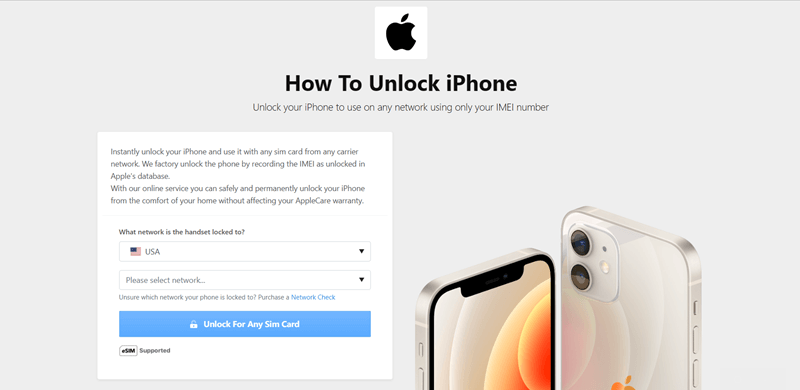
DirectUnlocks is on the front line to help you unlock your GSM-locked iPhone. It is a verified phone unlock site offering to permanently unlock your GSM-locked iPhone and keep your phone warranty intact.
While contacting your service provider takes 30 days to get you an unlock code, DirectUnlocks does this in just 6 hours.
That's cool.
In addition to the timely service, DirectUnlocks unlocks your phone remotely, so you can keep communicating as the process goes on behind the scenes.
On the flip side, the service isn't free. Even GSM-unlock freedom comes at a price; this one is affordable.
DirectUnlocks registers a 100% success rate for all phone brands, so iPhone users have nothing to fear.
Here are the steps to use DirectUnlocks' iPhone unlock service.
Unlock Your iPhone Now
- Choose the network that you want to unlock from. Select the carrier that applied the GSM lock on your iPhone.
- Type your phone's IMEI number in the required slot. You can find it by dialing *#06#.
- Make the required payment in full for the process to begin remotely.
The process takes up to 24 hours, but delays are imminent if you give the wrong information or fail to make complete payments.
Once the process is successful, the website sends you a confirmation email and text message on your phone.
Now you can confirm if your iPhone is GSM-unlocked.
2. Contact Your Mobile Carrier

Call your service provider through their customer care assistants and explain your situation.
Your assistant requests that you provide details about your iPhone to confirm ownership. This includes your phone's IMEI number.
You can get it by dialing *#06# on your phone or checking your Phone Settings>About Phone.
If you wish to call your service provider, here are the top customer service contacts
- AT&T - 1 800 331 0500
- Sprint - 1 888 211 4727
- T mobile - 1 877 746 0909
- Verizon - 1 800 711 8300
This method can take up to 30 days to process your unlock codes, and you might be asked to pay for the service, depending on your service provider's unlock policy.
Always check the terms and conditions.
3. Use Unlock Software
This is an alternative way to unlock your GSM-locked iPhone using computer software to bypass the GSM lock.
The only problem is that this process requires a few technical skills that anyone - not necessarily a tech whiz - can pull off successfully.
You need to connect your iPhone to a computer with the unlocking software. jailbreak your iPhone, and let it follow through to unlock your phone for both GSM and CDMA.
Be warned that this method might put your phone at risk. If the computer or software is corrupt, you risk uploading malware to your phone.
4. Change Your iPhone's Hardware
Changing your phone's hardware system to support GSM & CDMA is yet another way to get a GSM unlocked iPhone.
Be aware that there are more recommended means than this method.
Immediately after you open your phone to modify or change some of the hardware, you violate the terms of your will warranty agreement.
You cannot claim your warranty if you go down this part.
If you must, then the best thing to do is to seek the services of a certified and trustworthy mobile phone technician.
How to Confirm if Your iPhone is GSM Unlocked
The final step is to confirm that your iPhone is unlocked to use GSM and CDMA. This is the easy part.
Like most processes, you get more than one certified means to check if your iPhone is GSM unlocked.
They are:
- Use an IMEI checker.
- Check your phone's settings.
- Switch sim cards.
Once again, let's dive in.
You may like: How to Check iPhone Unlock Status?
1. Use an IMEI Checker
Use an IMEI checker online, to confirm if your beloved iPhone is GSM unlocked.
The IMEI checker should give you all the information regarding your phone. That's where you will find your answer.
2. Go Through Your iPhone Settings
The easiest way to confirm your iPhone's GSM unlock status is to look through your iPhone settings.
This is where to look.
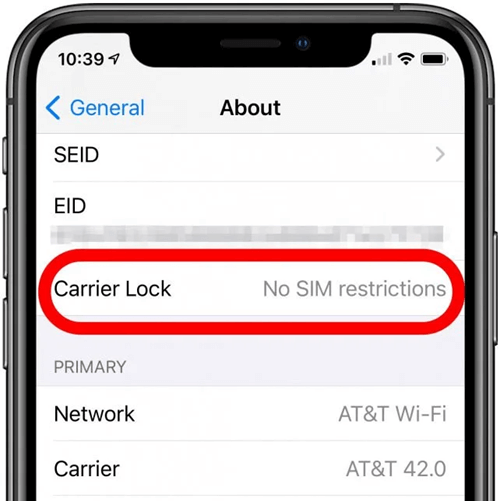
- Open your phone's Settings app
- Choose the About option
- Check the Carrier Lock option
If it shows "No SIM restrictions," then your iPhone is unlocked.
3. Switching Sim Cards
Insert a GSM or CDMA sim card into your phone to confirm the unlock status. If it picks up a signal, make a call or send a text message.
If it goes through, then it means your iPhone is GSM unlocked.
You may like: What Happens If You Switch Sim Cards in iPhones?
Takeaway
Don't be left behind by technology; unlock your iPhone to use any GSM network sim card.
You will have an advantage over GSM-locked iPhone users since they are tied to one particular. network. At the same time, you can mingle and choose different networks as you see fit.
Take the road to freedom and bypass your phone's GSM lock through any of the certified means.
If asking your carrier to let you go isn't fruitful, you can always look to DirectUnlocks to bail you out.
Whichever option you take, I wish you all the best.
See you on the rebound.
You May Like